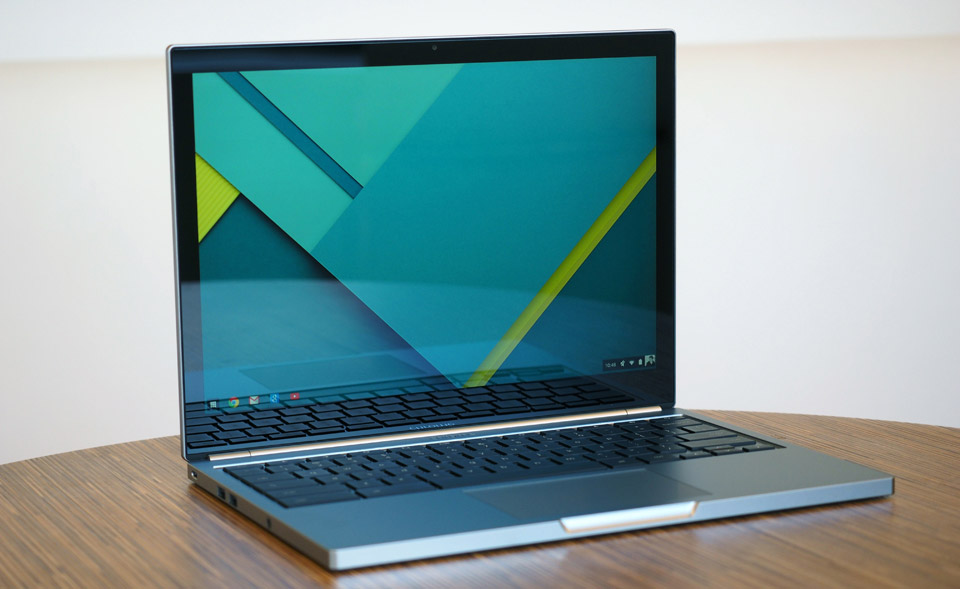
The Chromebook Pixel was the most beautiful laptop that we told people not to buy. With a machined aluminum chassis, pixel-dense screen and a spacious keyboard, it had a design that in some ways outmatched even the Retina display MacBook Pro. The problem: It ran Chrome OS for an operating system, with no support for the sort of desktop apps you’d expect to use on a $1,299 machine. Speaking of the sort, it cost $1,299. Oh, and the battery life was short too — barely four hours on a charge. So much for having a portable machine you could take anywhere. It was, as we said at the time, “a lovely thing that everyone should try to experience, but few should seriously consider buying.”
Chromebook Pixel (2015)
PROS
- Beautiful, high-res display
- Incredible build quality
- Great keyboard and trackpad
- Long battery life, charges quickly
- Mix of regular and USB Type-C ports
CONS
- Chrome OS has come a long way, but still has limitations
- Still feels expensive for what it is
- No real change in the thickness or weight
SUMMARYThough the Pixel looks the same as its predecessor, it feels like a big improvement, thanks to its tripled battery life and lower price. Chrome OS has come a long way too, to the point where the idea of doing everything online doesn’t seem like as crazy an idea as it once did. That said, as well-designed as the Pixel is, $999 is a lot to pay for a laptop that only runs Chrome OS, especially when comparable Mac and Windows machines can run all manner of desktop apps — including the Chrome browser.
As far as Google was concerned, though, the Pixel was just ahead of its time. That, and maybe it needed a little refining. Not to be deterred, the company just released a second-generation model, also called the Pixel. The idea, as Google explains it, is that it keeps everything people loved about the original, while correcting everything that made it a tough sell. That means the design is virtually identical, with an all-metal shell, 12.85-inch, 2,560 x 1,700 touchscreen and a well-spaced keyboard. This time, though, the battery is rated for 12 hours, partly thanks to Intel’s latest Core processors, and there are two reversible USB Type-C ports like the kind used on the new MacBook announced earlier this week (except in this case, there are some regular USB connections too). Meanwhile, Chrome OS is more polished than it was two years ago, and can now run a few Android apps. Most importantly, perhaps, Google dropped the Pixel’s starting price to $999. A 23 percent price cut isn’t exactly a trivial difference, but is it enough to turn the Pixel into a practical purchase? Not quite. But almost.
…
Read full post here:
https://www.engadget.com/2015-03-11-chromebook-pixel-review-2015.html
…
Read full post here:
https://www.engadget.com/2015-03-11-chromebook-pixel-review-2015.html