Skip to content
GearOpen.com

GearOpen.com

GearOpen.com is the hub for the latest developments in technology, AI, software, computers, transportation, consumer electronics, and scientific innovation.

  • Phones
  • Tablets
  • Laptops
  • Computers & IT
  • AI & Bots
  • Apps
  • Gaming
  • Audio & Video
  • Wearables
  • Smart Home
  • Cameras
  • Drones
  • Cars
  • Motorcycles
  • Yachts & Boats
  • Planes
  • Science
  • Tools
  • Toggle search form
Dell Chromebook 3180 Review

Dell Chromebook 3180 Review

Posted on May 13, 2017January 21, 2019 By Jarvis

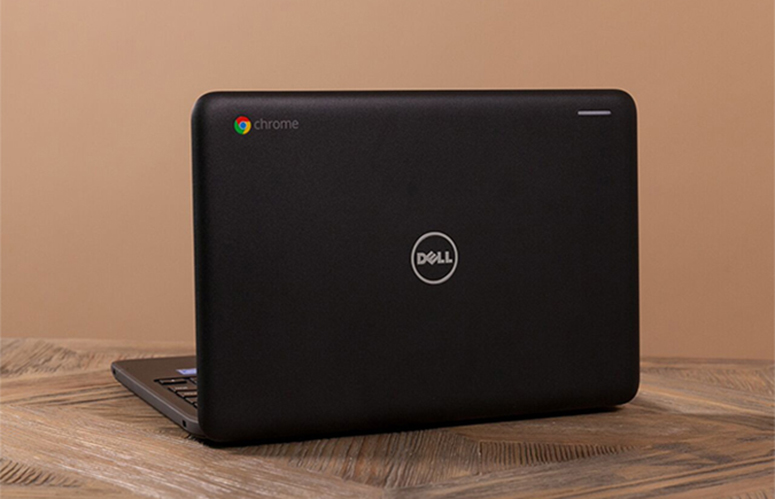
Educators often like to use Chromebooks in the classroom, because laptops with Google’s operating system are easy to use and hard to infect with malware. To meet students’ needs, a number of laptop makers have built durable, low-cost Chromebooks that can take a beating and handle elementary school curricula without breaking the bank. Starting at $229 ($259 as tested), Dell’s 11-inch Chromebook 3180 is a solid but unremarkable choice for schools, combining all-day battery life, a tough design and a set of LED lights on the back of the lid that students can use to virtually raise their hands in class.

Design

The Dell Chromebook 3180’s design is very basic. The outside is a muted black with the Dell logo in the center of the cover and a Chrome logo in one corner. Another corner has a narrow white bar, which is actually a three-color light (red, yellow and green) that can be used in a classroom to notify the teacher that child has a question or needs help (like raising a hand). The corners are rounded, and the surface of this Chromebook feels slightly rough. There is a rubber-like ring around the outside of the bottom of the computer to help absorb shocks.
…
Read full post here:
https://www.laptopmag.com/reviews/laptops/dell-chromebook-3180
Computers & IT Tags:Chrome, chromebook, chromebooks, computer, Dell, Google, laptop, LED, operating system, review, Surface

Post navigation

Previous Post: Nikon D7500 vs Canon 77D – Comparison
Next Post: Creative Sound BlasterX Kratos S5 2.1 gaming speakers review

Related Posts

Inside Lenovo Ideapad L340 Gaming (15″) – disassembly and upgrade options Inside Lenovo Ideapad L340 Gaming (15″) – disassembly and upgrade options Computers & IT
Dell XPS 17 9710 Top 5 reasons to BUY or NOT to buy the Dell XPS 17 9710 Computers & IT
OXS Storm A2 Review Computers & IT
MSI MPG X870I EDGE TI EVO WIFI Motherboard Review Computers & IT
LG Gram 17 first look: Lightweight champion? LG Gram 17 first look: Lightweight champion? Computers & IT
Lenovo Qualcomm 5G laptop – Hands on with ‘Project Limitless’ Review Lenovo Qualcomm 5G laptop – Hands on with ‘Project Limitless’ Review Computers & IT

Copyright © 2026 GearOpen.com.

Powered by PressBook Grid Dark theme