Skip to content
GearOpen.com

GearOpen.com

GearOpen.com is the hub for the latest developments in technology, AI, software, computers, transportation, consumer electronics, and scientific innovation.

  • Phones
  • Tablets
  • Laptops
  • Computers & IT
  • AI & Bots
  • Apps
  • Gaming
  • Audio & Video
  • Wearables
  • Smart Home
  • Cameras
  • Drones
  • Cars
  • Motorcycles
  • Yachts & Boats
  • Planes
  • Science
  • Tools
  • Toggle search form
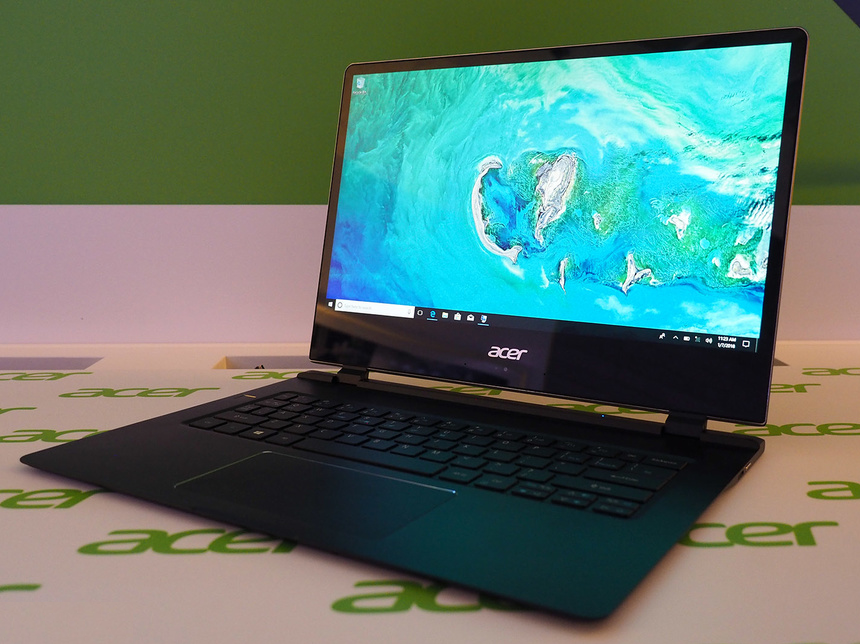
Acer Swift 7 (2018) hands-on review

Acer Swift 7 (2018) hands-on review : Laptops don’t get any skinnier than this…

Posted on January 8, 2018June 11, 2019 By Jarvis

Forget big and chunky gaming machines – what you want is an ultraportable so thin you could practically shave with it.

At a frankly ridiculous 8.98mm, Acer’s Swift 7 might even be thinner than the smartphone you’ve got in your pocket right now. It’s packing 4G LTE, too – so there’s no excuse for not taking it on the move.

Slim dimensions alone don’t make a great laptop, though. Does the Swift 7 have the full package, or is it too skinny for its own good? We gave one a spin at CES to find out.

DESIGN & BUILD

It sounds slim on paper, but in the metal the Swift 7 somehow feels even thinner. It felt really light, too, although Acer hasn’t revealed the specific weight just yet (and we neglected to bring a set of scales with us to Las Vegas).
…
Read full post here:
https://www.stuff.tv/acer/swift-7-2018/review

Computers & IT Tags:4g, 4g lte, Acer, ACER SWIFT 7, gaming, laptop, lte, review, smartphone, TV

Post navigation

Previous Post: Olympus M.ZUIKO Digital ED 17mm f/1.2 PRO Review
Next Post: Acer Chromebook 11 (2018) hands-on: USB-C and a blue finish keep things fresh

Related Posts

ASUS ROG Zephyrus GA502 review (Ryzen 7 3750H + GTX 1660 Ti Max-Q) – hope this doesn’t disappoint ASUS ROG Zephyrus GA502 review (Ryzen 7 3750H + GTX 1660 Ti Max-Q) – hope this doesn’t disappoint Computers & IT
Nvidia’s DLSS is an obvious choice over AMD’s FSR, but this shouldn’t dictate your GPU buying decisions Computers & IT
How to Check Your VRAM in Windows 10 How to Check Your VRAM in Windows 10 Computers & IT
13 brilliant tech bargains under $13 to upgrade your setup — lock down the best cheap PC gadgets and accessories with Prime Day discounts Computers & IT
Apple’s solution for bad Mac webcams shouldn’t be the iPhone Computers & IT
Microsoft ridicules MacBook Pro for not having a touch screen — forgets about iPad Pro Computers & IT

Copyright © 2026 GearOpen.com.

Powered by PressBook Grid Dark theme