Skip to content
GearOpen.com

GearOpen.com

GearOpen.com is the hub for the latest developments in technology, AI, software, computers, transportation, consumer electronics, and scientific innovation.

  • Phones
  • Tablets
  • Laptops
  • Computers & IT
  • AI & Bots
  • Apps
  • Gaming
  • Audio & Video
  • Wearables
  • Smart Home
  • Cameras
  • Drones
  • Cars
  • Motorcycles
  • Yachts & Boats
  • Planes
  • Science
  • Tools
  • Toggle search form
premier-ZEB-916B--pic1

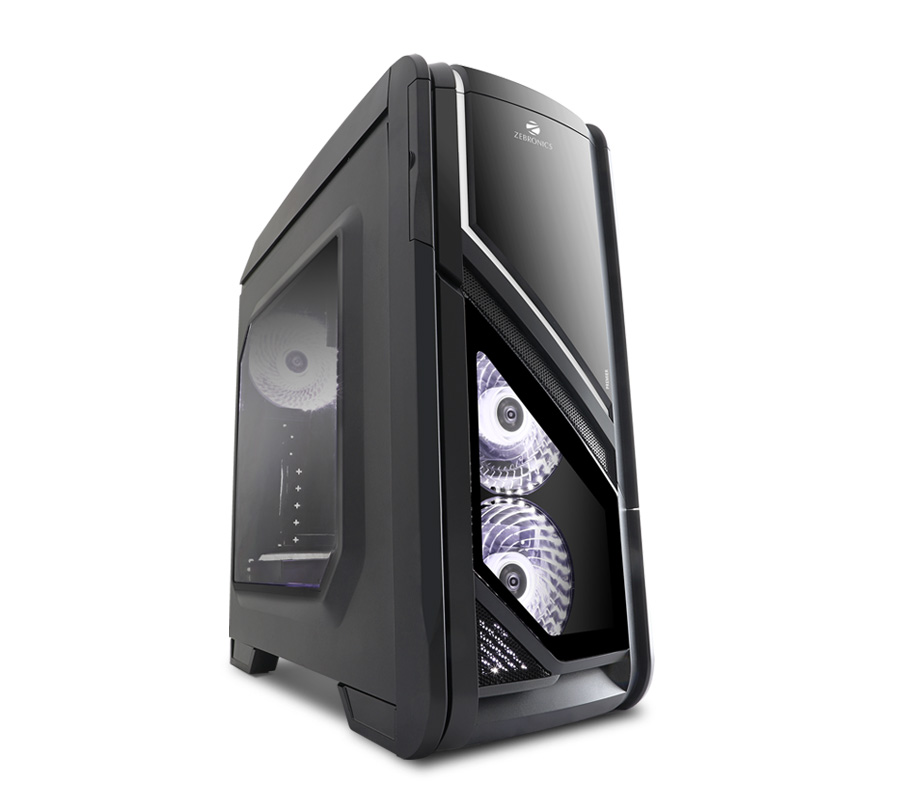
Zebronics Premier ZEB-916B Review

Posted on January 14, 2018June 11, 2019 By Jarvis

Our Verdict

Let’s summarise all the aspects of the Premier before giving out our final verdict. There are two 120mm fans on the front panel and one 120mm fan on the back panel installed which are incredibly bright with white LEDs. It would have been great if there was a button to switch on and off the LED lights on the fans but that’s asking too much at this price. The top panel contains all the IO ports including two USB 2.0 and one USB 3.0 ports, audio out and mic in ports, power and reset button, and an SD/microSD card slot. There are two mounts on the top panel for two 120mm fans, but we were successful in installing only one otherwise the top panel wouldn’t attach.

You will be able to install a GPU with a maximum length of 270mm. If your GPU is longer (up to 320mm) then you will have to remove the SSD cage. There’s no room to install radiators anywhere in the cabinet which could be an issue if you’re planning an upgrade to liquid cooling. With our test rig, the CPU touched 70 degree Celsius in our Prime95 stress test.
…
Read full post here:
https://www.digit.in/reviews/pc-components/zebronics-premier-zeb-916b-review-125183.html

Computers & IT Tags:audio, gpu, LED, LEDs, PC, review, sd, SSD, usb, usb 3.0, Zebronics Premier ZEB-916B

Post navigation

Previous Post: 2019 Ford Ranger revealed in Detroit with 2.3L EcoBoost
Next Post: 2019 Chevrolet Silverado adds tech, drops weight, snarks F-150

Related Posts

Intel Core i7-11700K falls flat in leaked performance benchmarks M1 PassMark promotion over Intel Core i7-11700K clarifies the damage Apple Silicon has done to Rocket Lake Computers & IT
Can’t wait for the touchscreen MacBook Pro M6? This wild, affordable accessory brings touch to your current Mac Computers & IT
How to Find the Wi-Fi Password for Every Network You’ve Ever Connected To Computers & IT
adata-ultimatesu800ssd-1_674_cf6f0 Adata SSD Ultimate SU800 review Computers & IT
Quordle hints and answers for Friday, March 20 (game #1516) Computers & IT
M3 Mac mini: Everything you need to know Computers & IT

Copyright © 2026 GearOpen.com.

Powered by PressBook Grid Dark theme