Skip to content
GearOpen.com

GearOpen.com

GearOpen.com is the hub for the latest developments in technology, AI, software, computers, transportation, consumer electronics, and scientific innovation.

  • Phones
  • Tablets
  • Laptops
  • Computers & IT
  • AI & Bots
  • Apps
  • Gaming
  • Audio & Video
  • Wearables
  • Smart Home
  • Cameras
  • Drones
  • Cars
  • Motorcycles
  • Yachts & Boats
  • Planes
  • Science
  • Tools
  • Toggle search form
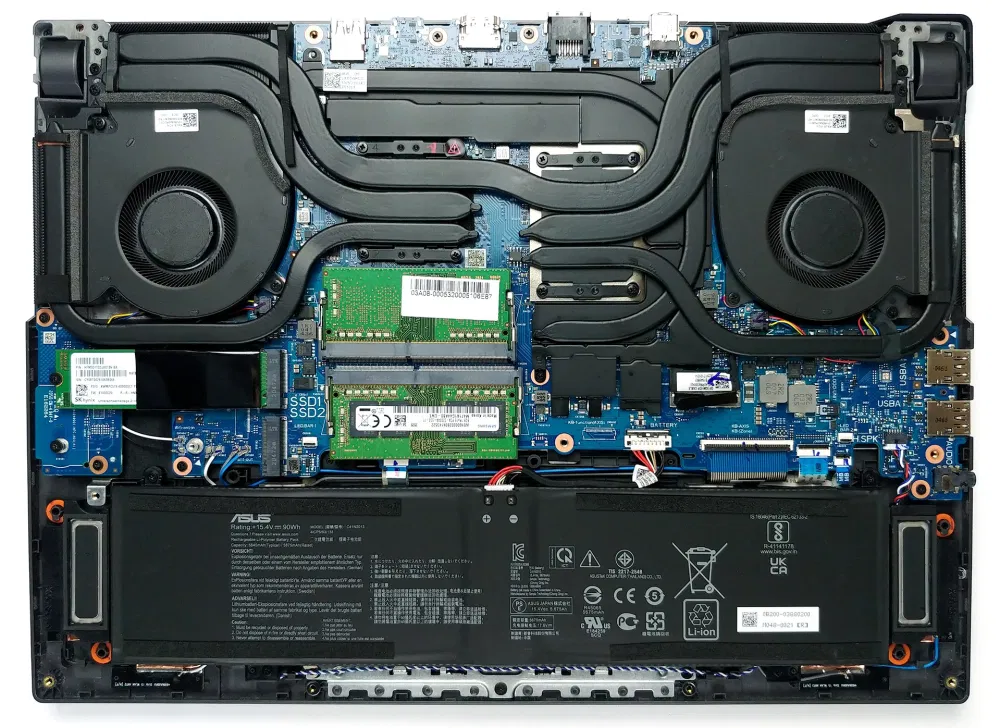
Inside ASUS ROG Strix G15 G513 – disassembly and upgrade options

Inside ASUS ROG Strix G15 G513 – disassembly and upgrade options

Posted on March 25, 2021August 27, 2023 By Jarvis

Although the upgradability here is spot on, we see it as a subtle downgrade from last year.

1. Remove the bottom plate

In order to take this device’s bottom panel off, you need to undo 11 Phillips-head screws. After that carefully pry your way around the panel, and gently lift it. Don’t be too hasty, though, because you need to unclip the LED strip ribbon cables.
…
Read more


Computers & IT Tags:Asus, Asus ROG, LED

Post navigation

Previous Post: Mazda3 Turbo still on the agenda for Oz
Next Post: New Myzone MZ-Switch HRM blends ECG and optical HR so you can wear it anywhere

Related Posts

Microsoft is working on some seriously exciting Windows 11 improvements – but not everyone will get them Computers & IT
Google Chrome 5 Tips For Fixing Google Chrome Battery Drain Problem on Mac Computers & IT
I entered a VR bowling tournament and somehow won $1,000 Computers & IT
Best Gaming Laptops Under $1,000 – Update 2019 Best Gaming Laptops Under $1,000 – Update 2019 Computers & IT
http://media.bestofmicro.com/ext/aHR0cDovL21lZGlhLmJlc3RvZm1pY3JvLmNvbS9aL0UvNTgzMTc4L29yaWdpbmFsL0xHLTI3VUQ4OC13X0JCLmpwZw==/r_340x340.jpg LG 27UD88-W Monitor Review — Beautiful But Pricey 4K Computers & IT
Twister Air Replaces the Mat With an Augmented Reality App Computers & IT

Copyright © 2026 GearOpen.com.

Powered by PressBook Grid Dark theme