ACER has been improving its presence in ESports and gaming with its Predator sub-brand. Since its launch in 2015, the Predator line has slowly expanded not just with gaming desktops and laptops, but also with gaming-oriented peripherals to improve every player’s gameplay.

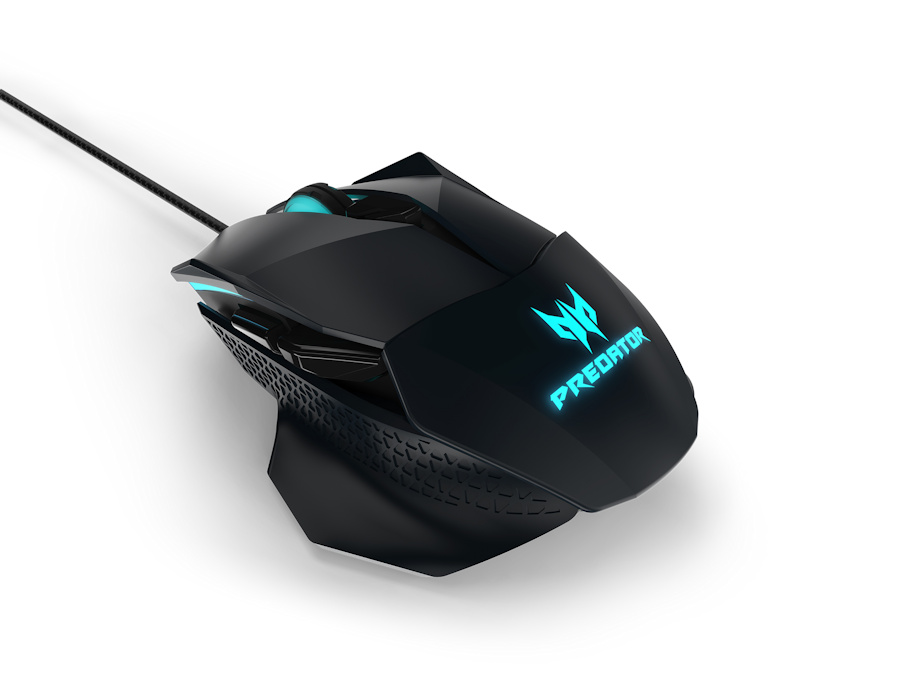
Among these new peripherals is the Cestus 500 Gaming Mouse. Launched during IFA 2017, Acer’s gaming mouse offering is their contender against a sea of gaming mice out there. As someone who uses a trackpad more often than a mouse, I don’t really get the sense of investing in a gaming mouse at first. That being said, let’s check out what makes the Cestus 500 special.

Adjustable clicking resistance
What makes the Cestus 500 stand out from other gaming mice is its adjustable clicking resistance. Located at the bottom, these Omron switches individually adjust the clicking resistance according to your usage. I set up the Cestus 500 to have a lighter click resistance for the left button, and a stiffer click resistance on the right, which makes it more convenient for me especially when I have to edit photos and videos.

More than ambidextrous
Designed as an ambidextrous gaming mouse, the Cestus 500 can be configured further with a pair of slim and wide fins for both the left and right side. At first, I didn’t get the point of having such flexibility, but by setting it to fit my right hand well (using the wide fin for the left side and slim fin for the right side), I realized that it helps in giving you the best possible hand and wrist comfort in using the Cestus 500 for a prolonged period.

As a gaming mouse, it is not surprising to see several buttons on the Cestus 500. In fact, it has a total of 8 buttons, all customizable depending on your needs. One catch though: You have to be using a Windows PC to make the most out of these buttons. On a Mac, the other buttons (specifically the side and scroll wheel button) have a preset function, which is not a bad thing.

The black button right below the scroll wheel serves as a DPI switch, where you can adjust the Cestus 500’s tracking sensitivity on the go. Like most gaming mice, the Cestus 500 is equipped with RGB lighting, which is configurable to different colors. By default, it illuminates in glacial blue—the Predator’s trademark color.

Premium quality
Considering it is a high-end gaming mouse, the Cestus 500 comes with a premium build, which includes a heavy-duty gold-plated USB connector and a braided nylon cable. On top of that, the Cestus 500 comes with a soft suede pouch should you bring it with you while you travel.
At $80, the Cestus 500 is worth considering if you are looking for a mouse that has one of the broadest customization options out there. There’s no official announcement on its local availability yet, but we expect ACER to price the Cestus 500 at around $70 when it is available in stores.
(unbox.ph, https://goo.gl/crnffo)