Skip to content
GearOpen.com

GearOpen.com

GearOpen.com is the hub for the latest developments in technology, AI, software, computers, transportation, consumer electronics, and scientific innovation.

  • Phones
  • Tablets
  • Laptops
  • Computers & IT
  • AI & Bots
  • Apps
  • Gaming
  • Audio & Video
  • Wearables
  • Smart Home
  • Cameras
  • Drones
  • Cars
  • Motorcycles
  • Yachts & Boats
  • Planes
  • Science
  • Tools
  • Toggle search form
Inside Dell Latitude 13 5310 – disassembly and upgrade options

Inside Dell Latitude 13 5310 – disassembly and upgrade options

Posted on October 28, 2020August 27, 2023 By Jarvis

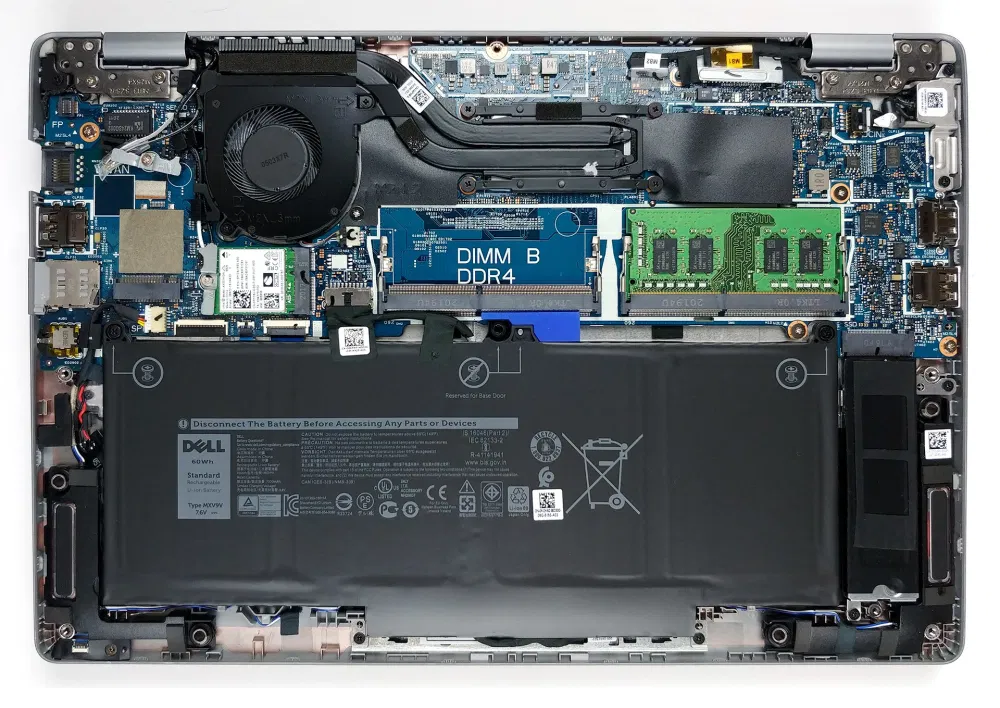
A 13-inch notebook with two RAM SODIMM slots? Now that’s rare!

1. Remove the bottom plate

This device’s bottom panel is held in place by 8 Phillips-head captive screws. So after you undo them, there is basically no chance of losing them. In order to take the panel away, you need to pry it with a plastic tool.

2. Battery

In terms of battery, you got a 60Wh unit.
…
Continue here:
https://laptopmedia.com/highlights/inside-dell-latitude-13-5310-disassembly-and-upgrade-options/

Computers & IT Tags:Dell, notebook, ram

Post navigation

Previous Post: iPhone 12 Ceramic Shield display has one big flaw
Next Post: New Citroen C3 and C4 to lead brand’s fightback

Related Posts

Quordle hints and answers for Tuesday, October 7 (game #1352) Computers & IT
Compact by design: Why smaller gaming laptops are better suited to student life Computers & IT
Following Bing AI, Google could bring AI writing tools to Chromebooks Computers & IT
Apple’s solution for bad Mac webcams shouldn’t be the iPhone Computers & IT
Intel announces Core Ultra 200 series desktop CPUs, the first desktop AI processors on the market Computers & IT
Intel 11th Gen Tiger Lake laptops we're most excited about Intel 11th Gen Tiger Lake laptops we’re most excited about Computers & IT

Copyright © 2026 GearOpen.com.

Powered by PressBook Grid Dark theme