Skip to content
GearOpen.com

GearOpen.com

GearOpen.com is the hub for the latest developments in technology, AI, software, computers, transportation, consumer electronics, and scientific innovation.

  • Phones
  • Tablets
  • Laptops
  • Computers & IT
  • AI & Bots
  • Apps
  • Gaming
  • Audio & Video
  • Wearables
  • Smart Home
  • Cameras
  • Drones
  • Cars
  • Motorcycles
  • Yachts & Boats
  • Planes
  • Science
  • Tools
  • Toggle search form
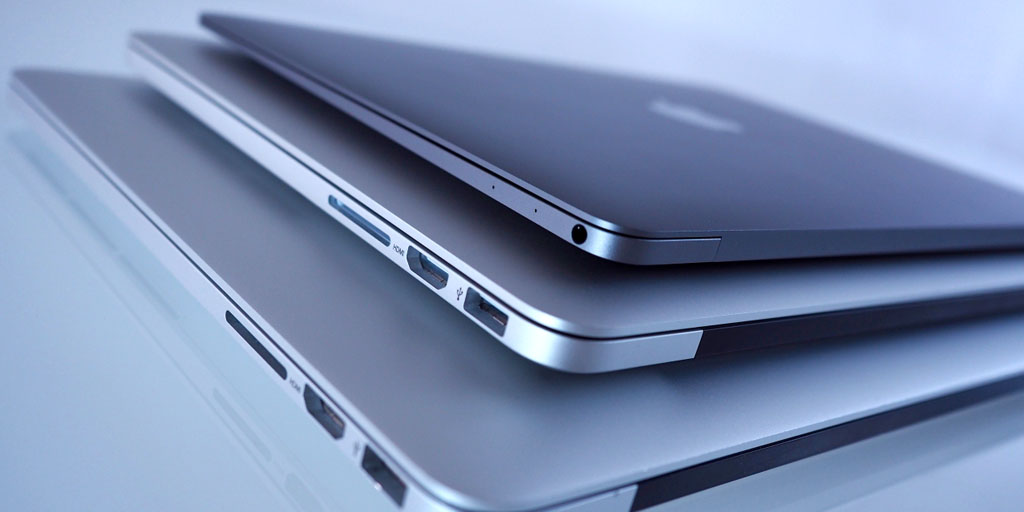
Inside Dell XPS 17 9710

Inside Dell XPS 17 9710 – disassembly and upgrade options

Posted on October 16, 2021August 27, 2023 By Jarvis

It’s remarkable how Dell managed to put any upgrade options on a device this thin.

1. Remove the bottom plate

To get inside of this device, you need to undo all 8 Torx-head screws. After that, pry the bottom panel, and be careful with the sharp aluminum edges.
…
Read more

Computers & IT Tags:Dell, Dell XPS 17

Post navigation

Previous Post: Oppo K9 Pro will get a new color variant on October 20
Next Post: Ricoh Announces HD PENTAX-D FA 21mm f/2.4 ED Limited DC WR Lens

Related Posts

Dell G15 Gaming Laptop Goes Camo, Alienware Ships AMD-Refreshed Systems Computers & IT
LC27FG70FQNXZA_001_L-Perspective_Black_121916 Samsung CFG70 Series 27-inch Curved Gaming Monitor review Computers & IT
Microsoft Surface Laptop 4 models leak with AMD and Intel details Microsoft Surface Laptop 4 could disappoint with older AMD hardware Computers & IT
Inside Lenovo ThinkBook 14 Gen 2 – disassembly and upgrade options Inside Lenovo ThinkBook 14 Gen 2 – disassembly and upgrade options Computers & IT
Top 5 Reasons to BUY or NOT buy the HP EliteBook 850 G6 Top 5 Reasons to BUY or NOT buy the HP EliteBook 850 G6 Computers & IT
Work, Stream and Game Through Blackouts With a CyberPower Battery Backup System Computers & IT

Copyright © 2026 GearOpen.com.

Powered by PressBook Grid Dark theme