Skip to content
GearOpen.com

GearOpen.com

GearOpen.com is the hub for the latest developments in technology, AI, software, computers, transportation, consumer electronics, and scientific innovation.

  • Phones
  • Tablets
  • Laptops
  • Computers & IT
  • AI & Bots
  • Apps
  • Gaming
  • Audio & Video
  • Wearables
  • Smart Home
  • Cameras
  • Drones
  • Cars
  • Motorcycles
  • Yachts & Boats
  • Planes
  • Science
  • Tools
  • Toggle search form
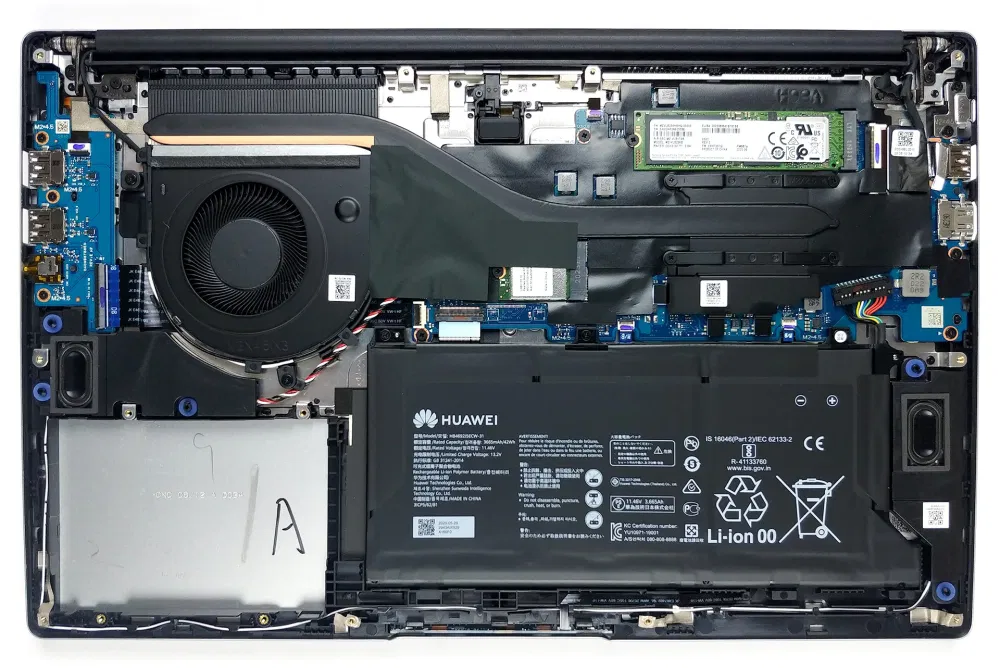
Inside Huawei MateBook D 15 (2020) – disassembly and upgrade options

Inside Huawei MateBook D 15 (2020) – disassembly and upgrade options

Posted on October 28, 2020August 27, 2023 By Jarvis

Quite a lot of storage options, and no memory upgrades.

1. Remove the bottom plate

Prior to getting inside of the machine, you need to undo 10 Torx-head screws. Then just pop the bottom panel with a plastic tool, and that’s it.

2. Battery

Interestingly, instead of the 56Wh unit, we saw on the 14-inch model, there is a 42Wh pack on this device.
…
Continue here:
https://laptopmedia.com/highlights/inside-huawei-matebook-d-15-2020-disassembly-and-upgrade-options/

Computers & IT Tags:Huawei, Huawei Matebook, Huawei MateBook D, memory

Post navigation

Previous Post: Fujifilm FinePix JV200 / JV205 Camera
Next Post: Five iPhone 12 features you won’t find on any Android phone (and one Apple is missing)

Related Posts

Snag a Reliable UPS for Up to 34% Off and Never Lose Your Progress Again Computers & IT
What Is the Newest Generation of the iPad? Computers & IT
HP Omen 15 leak reveals overhauled design, AMD and Nvidia chips HP Omen 15 leak reveals overhauled design, AMD and Nvidia chips Computers & IT
HP 15 (15-dw1000) review – you get a lot for such a low price HP 15 (15-dw1000) review – you get a lot for such a low price Computers & IT
The World’s first color E-Ink monitor looks wild – but we have questions Computers & IT
Hands on: Dell XPS 14: a well-balanced thin and light Ultrabook Computers & IT

Copyright © 2026 GearOpen.com.

Powered by PressBook Grid Dark theme