Skip to content
GearOpen.com

GearOpen.com

GearOpen.com is the hub for the latest developments in technology, AI, software, computers, transportation, consumer electronics, and scientific innovation.

  • Phones
  • Tablets
  • Laptops
  • Computers & IT
  • AI & Bots
  • Apps
  • Gaming
  • Audio & Video
  • Wearables
  • Smart Home
  • Cameras
  • Drones
  • Cars
  • Motorcycles
  • Yachts & Boats
  • Planes
  • Science
  • Tools
  • Toggle search form
Inside Dell XPS 15 9500 – disassembly and upgrade options

Inside Dell XPS 15 9500 – disassembly and upgrade options

Posted on August 11, 2020August 27, 2023 By Jarvis

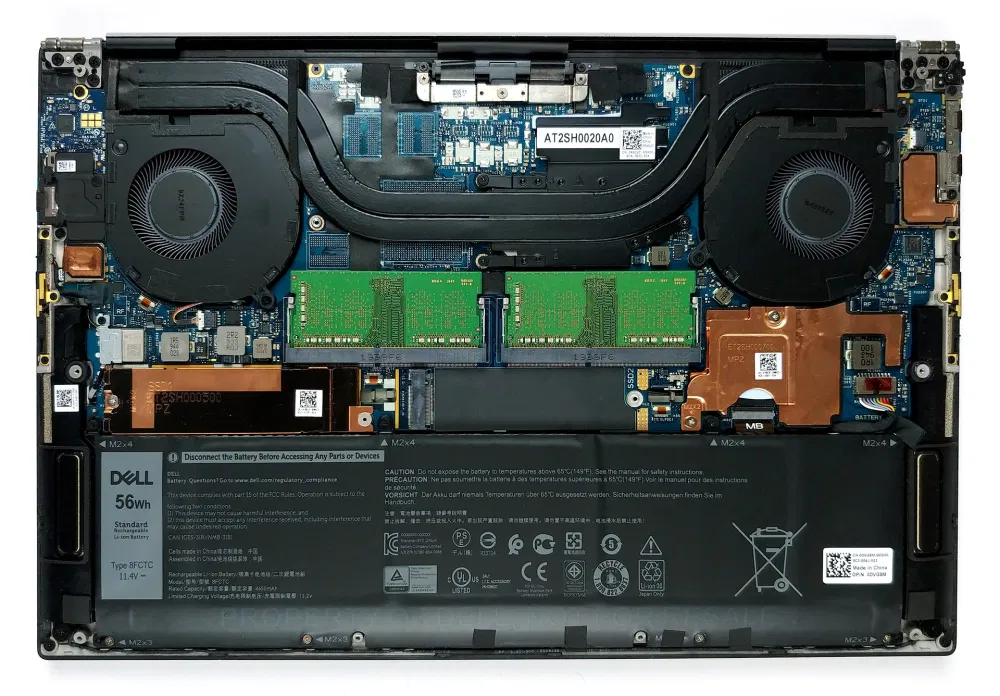
Let’s see what’s inside of this year’s XPS 15, and how easy it is to disassemble.

1. Remove the bottom plate

Getting inside this notebook requires the removal of the bottom panel. To do so, you need to undo 8 Torx-head screws and pry the plate from the chassis. Keep in mind you would want to start from the battery-charge indicator on the front side of the device.

2. Battery

In terms of battery, there are two available options. The one that our unit has is a 56Wh 3-cell package, while the bigger one has a capacity of 86Wh and is built out of 6 cells.
…
Read full post here:
https://laptopmedia.com/highlights/inside-dell-xps-15-9500-disassembly-and-upgrade-options/
Computers & IT Tags:Dell, Dell XPS 15, notebook

Post navigation

Previous Post: Maxum 2000 SR3 Boat Review
Next Post: Pininfarina Battista hits the road

Related Posts

Acer’s first AMD graphics card, the Predator BiFrost RX 7600, looks promising Computers & IT
Framework Laptop 16 Computers & IT
These are the 8 editor-approved laptops I’d buy this week from $199 Computers & IT
How to Connect AirPods to a MacBook Air Computers & IT
Alienware Area 51 Threadripper Review: Kick Ass for the Price Alienware Area 51 Threadripper Review: Kick Ass for the Price Computers & IT
MSI WS66 (11Ux) [Specs, Info, and Prices] MSI levels up its workstation laptops with the MSI WS66 (11Ux) Computers & IT

Copyright © 2026 GearOpen.com.

Powered by PressBook Grid Dark theme