Skip to content
GearOpen.com

GearOpen.com

GearOpen.com is the hub for the latest developments in technology, AI, software, computers, transportation, consumer electronics, and scientific innovation.

  • Phones
  • Tablets
  • Laptops
  • Computers & IT
  • AI & Bots
  • Apps
  • Gaming
  • Audio & Video
  • Wearables
  • Smart Home
  • Cameras
  • Drones
  • Cars
  • Motorcycles
  • Yachts & Boats
  • Planes
  • Science
  • Tools
  • Toggle search form
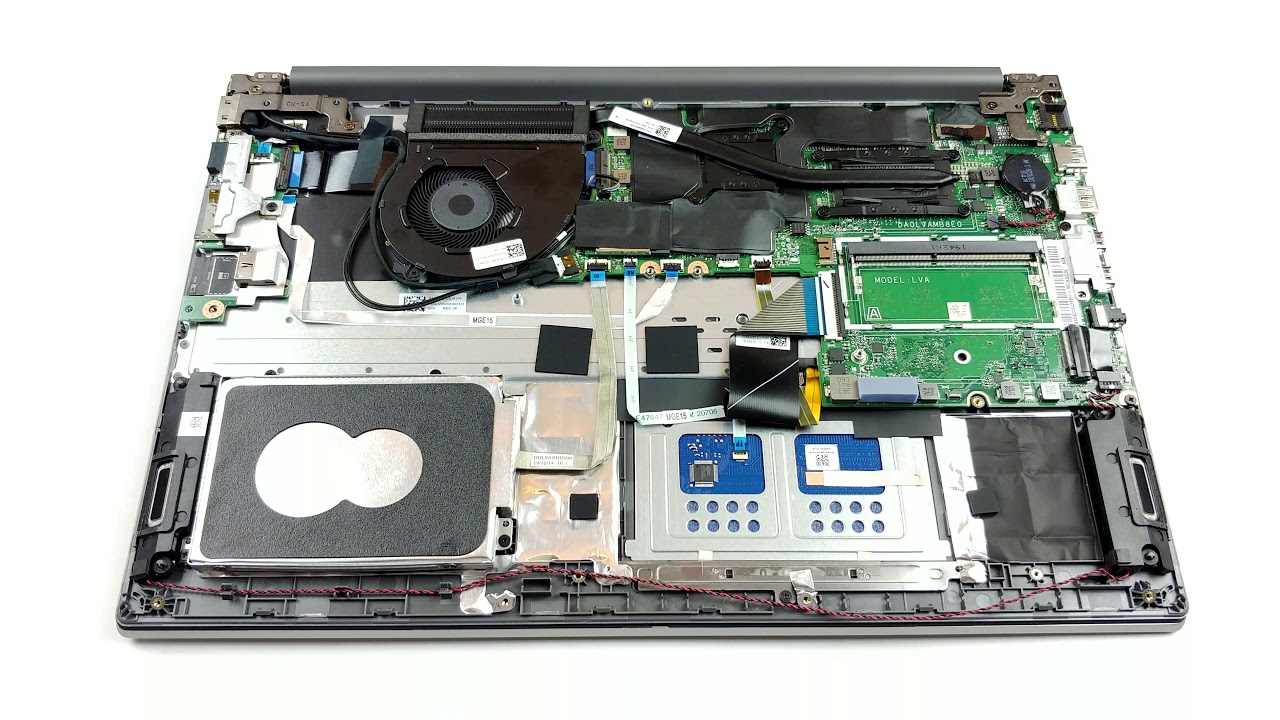
Inside Lenovo ThinkPad L15 – disassembly and upgrade options

Inside Lenovo ThinkPad L15 – disassembly and upgrade options

Posted on August 3, 2020August 27, 2023 By Jarvis

Quite honestly, this laptop is not too far from being an ordinary business notebook. However, it supports up to 64GB of DDR4 memory in dual channel, which is still something rarely seen on the market.

1. Remove the bottom plate

In order to make changes on the inside of this device, you have to undo 9 Phillips-head screws. They stay attached to the bottom panel even after you unscrew them, which means it would be difficult to lose them. Before starting the prying process, make sure you remove the SIM card tray.

2. Battery

Unfortunately, the 45Wh battery pack in this notebook is glued to the chassis, in addition to being secured by three Phillips-head screws. We don’t really see a point of Lenovo doing so, other than preventing customers change their batteries, should the die after the warranty period ends.
…
Read full post here:
https://laptopmedia.com/highlights/inside-lenovo-thinkpad-l15-disassembly-and-upgrade-options/

Computers & IT Tags:business, laptop, Lenovo, memory, notebook, thinkpad

Post navigation

Previous Post: Pixel 4a: You’ll have to wait a while to actually buy Google’s new cheap phone in the UK
Next Post: More powerful Toyota Prado coming October

Related Posts

Mailchimp Review: Pros & Cons, Features, Ratings, Pricing and more Computers & IT
Lenovo Q27H-10 review Lenovo Q27H-10 review Computers & IT
Apple iMac 24 M1 2021 Apple iMac 24 M1 2021 in review: Does Apple’s M1 SoC also convince in the desktop? Computers & IT
MSI GT80 Titan review Computers & IT
Microsoft Surface Dock Review : Turn Surface Into a Desktop Microsoft Surface Dock Review : Turn Surface Into a Desktop Computers & IT
Intel Core i7-8650U vs Intel Core i7-8550U – benchmarks and performance comparison Intel Core i7-8650U vs Intel Core i7-8550U – benchmarks and performance comparison Computers & IT

Copyright © 2026 GearOpen.com.

Powered by PressBook Grid Dark theme