Skip to content
GearOpen.com

GearOpen.com

GearOpen.com is the hub for the latest developments in technology, AI, software, computers, transportation, consumer electronics, and scientific innovation.

  • Phones
  • Tablets
  • Laptops
  • Computers & IT
  • AI & Bots
  • Apps
  • Gaming
  • Audio & Video
  • Wearables
  • Smart Home
  • Cameras
  • Drones
  • Cars
  • Motorcycles
  • Yachts & Boats
  • Planes
  • Science
  • Tools
  • Toggle search form
Inside Acer TravelMate P2 (TMP215-52) – disassembly and upgrade options

Inside Acer TravelMate P2 (TMP215-52) – disassembly and upgrade options

Posted on July 3, 2020August 27, 2023 By Jarvis

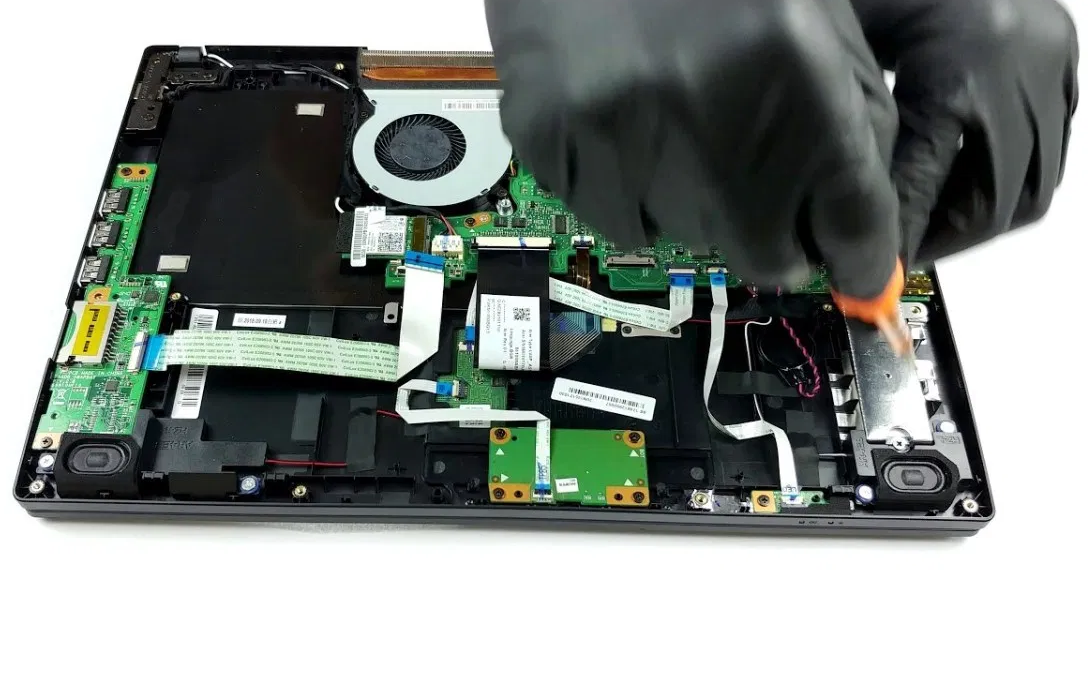
Although we weren’t able to perform most of our tests, it was good to see that the upgradability is decent on this unit.

[su_youtube url=”https://youtu.be/22vkuB4p7m8″]

1. Remove the bottom plate

Accessing this laptop’s internals is a relatively easy job. First, you need to undo 12 Phillips-head screws. Then, pry the bottom panel away with a plastic tool and you’re ready for taking off.

2. Battery

Battery-wise we have a 50Wh unit, which is secured in place by some scotch tape. Perhaps the regular screws are too expensive nowadays.
…
Read full post here:
https://laptopmedia.com/highlights/inside-acer-travelmate-p2-tmp215-52-disassembly-and-upgrade-options/

Computers & IT Tags:Acer, Acer TravelMate P2, laptop

Post navigation

Previous Post: Will vlogging change your next camera?
Next Post: What’s Actually the Difference Between a Cheap and Expensive Soundbar?

Related Posts

The Next iPad and iPad Pro Could Bring Plenty of Upgrades Computers & IT
Mac processor comparison: M1 & M2 vs Intel Computers & IT
Overclockers Titan Virtual Force Review Computers & IT
Hands on: Ugreen NASync DXP8800 Plus review Computers & IT
iPhone Mirroring on Mac is the real Apple intelligence we needed Computers & IT
Fractal Define One case review: Balancing noise and thermals Computers & IT

Copyright © 2026 GearOpen.com.

Powered by PressBook Grid Dark theme